Advance CSS Styling
Advanced CSS Styling
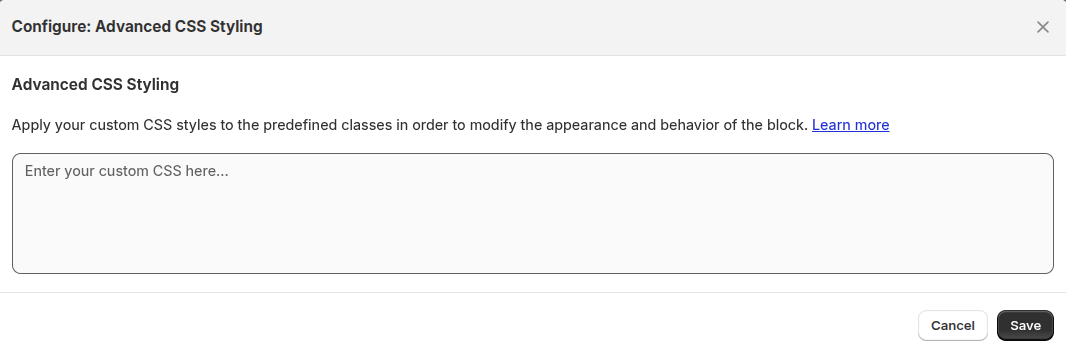 Use this section to apply custom CSS styles to modify the look and feel of the availability block.
Enter your CSS in the field provided to:
Use this section to apply custom CSS styles to modify the look and feel of the availability block.
Enter your CSS in the field provided to:
- Match your brand’s design
- Adjust spacing, fonts, or colors
- Hide or highlight certain elements
CSS Classes Reference
Main Containers & Layout
| Class | Definition |
|---|---|
.multilocation-block | Main block container for multilocation functionality |
.multiloca-availability-container | Main container for availability display |
.multiloca-location-container | Container for location list display |
.location-container | Container for individual location cards |
.multiloca-container-bottom-margin | Container with bottom margin spacing |
.location-list-container | Container for location list |
.location-info | Container for location information |
.loading-message | Applied to elements showing loading state |
.location-AvailableHeading | Applied to the heading div displaying "Availability" |
.multilocation-header | Header section for multilocation |
.heading-text | Text element for headings |
Location Display Elements
| Class | Definition |
|---|---|
.location-address | Class for paragraph elements that display the location address |
.location-phone | Class for paragraph elements that display the location phone number |
.location-distance | Class for elements displaying the distance to the location |
.multiloca-distance | Element displaying distance to location |
.location-direction | Class for elements providing a link or details to navigate to the location |
.location-radio-and-label | Container for radio buttons and their labels |
.location-radio-button | Radio button for location selection |
.location-footer-note | Class applied to the footer note for additional messaging or instruction |
.location-notes | Notes about the location |
.location-notess | Alternative location notes class |
.location-count | Display element showing count of locations |
View Layouts
| Class | Definition |
|---|---|
.listview | Applied to list view layout |
.list-view | Alternative list view class |
.grid-view | Grid view layout |
.grid-view-card | Card in grid view |
.scroll-view | Scrollable view layout |
.scroll-view-label | Label in scroll view |
.scroll-card-wrapper | Wrapper for scrollable card elements |
.expand-view | Expandable view layout |
.expand-view-card | Card in expand view |
.block-expand-view | Block expand view layout |
.new-view | New view layout style |
.new-view-card | Card in new view |
.new-view-sections-container | Container for sections in new view |
.new-view-left-section | Left section in new view |
.new-view-right-section | Right section in new view |
.two-columns | Two-column layout |
.two-columns-label | Label in two-column layout |
.three-columns | Three-column layout |
.three-columns-label | Label in three-column layout |
.multi_app_grid | Grid layout for multi-app view |
Location Cards
| Class | Definition |
|---|---|
.location-card-listview | Location card in list view layout |
.location-card-listviews | Alternative list view card class |
.location-card-multiapp | Location card in multi-app view |
.location-card-multiapps | Alternative multi-app card class |
.location-card-drawer-list-view | Location card in drawer list view |
.location-card-drawer-list-view-selected | Selected location card in drawer list view |
.location-card-drawer-list-view-name | Name element in drawer list view card |
.multiloca-online-location-card | Card for online location option |
.multiloca-online-location-label | Label for online location |
.multiloca-online-location-info | Information display for online location |
.multiloca-physical-location-label | Label for physical location |
.multiloca-physical-location-info | Information display for physical location |
Popup Components
| Class | Definition |
|---|---|
.multiloca-popup-header | Header container for the location popup |
.multiloca-popup-content | Main content container for the location popup |
.popup-description | Description text container within the popup |
.vertical-list-popup | Applied to popup when using list style layout |
.multiloca-popup-location-dropdown-popup | Dropdown select element for location selection in popup |
.multiloca-popup-location-grid | Grid container for location cards in popup |
.multiloca-popup-location-list | List container for locations in popup |
.multiloca-popup-location-inline | Inline list container for locations in popup |
.multiloca-popup-location-item | Individual location item in the popup |
.multiloca-popup-location-name | Name element within a location item |
.multiloca-popup-location-details | Details section of popup location item |
.location-popup-header | Header element for location popup display |
.popup-back-button | Back button in popup navigation |
.custom_popup-overlay | Overlay for custom popup |
.custom_popup-content | Content area of custom popup |
.custom_popup__close | Close button for custom popup |
.custom_popup__header | Header section of custom popup |
.custom_popup__wrapper | Wrapper for custom popup |
.multiloca-inventory-popup-title | Title for inventory popup |
.multiloca-inventory-popup-content | Content area for inventory popup |
.multiloca-toast-popup | Toast popup notification |
.multiloca-toast-header | Header section of toast popup |
.multiloca-toast-title | Title of toast popup |
.toastList | List container in toast popup |
.multiloca-toast-body | Body content of toast popup |
Drawer Components
| Class | Definition |
|---|---|
.custom_drawer | Custom drawer component |
.custom_drawer__header | Header section of custom drawer |
.custom_drawer__close | Close button for custom drawer |
.custom_drawer__wrapper | Wrapper for custom drawer |
.custom_drawer__content | Content area of custom drawer |
.custom_drawer.is-active | Active state of custom drawer |
.custom_drawer.is-visible | Visible state of custom drawer |
.custom_drawer.has-map-view.is-visible .custom_drawer__overlay | Overlay when drawer has map view |
.drawer-location-container | Container for locations in drawer view |
.drawer-trigger-button | Button that triggers drawer to open |
Store Locator
| Class | Definition |
|---|---|
.store-locator-close-btn | Close button for store locator |
.store-locator-button-container | Container for store locator buttons |
.store-locator-open-btn | Button to open store locator |
.store-header-container | Container for store locator header |
.store-header | Header element in store locator |
.store-close-btn | Close button in store header |
.store-body-container | Main body container for store locator |
.store-locations-container | Container for store locations list |
.store-map-container | Container for store map display |
.store-map | Map display element |
.store-card | Card element for store information |
.store-title | Title element for store information |
.store-location-item-container | Container for store location items |
.store-location-item-name | Name of the store location |
.store-location-item-address | Address of the store location |
.store-location-item-phone | Phone number of the store location |
.store-location-item-email | Email of the store location |
.store-location-item-stock | Stock information for store location |
.store-location-item-distance | Distance to store location |
.store-location-item-directions | Directions link for store location item |
.store-location-item-opening-hours-link | Link to view opening hours for location item |
.store-location-item-opening-hours-table | Table for opening hours in location item |
.store-info-item | Individual information item in store card |
.store-address | Store address element |
.store-info-label | Label for store information |
.store-info-value | Value for store information |
.store-phone | Store phone information element |
.store-phone-link | Link to call store phone |
.store-directions | Store directions element |
.store-directions-link | Link to get directions |
.store-opening-hours | Store opening hours element |
.store-opening-hours-link | Link to view opening hours |
.store-opening-hours-table | Table displaying opening hours |
.store-quantity | Store quantity information element |
.store-quantity-label | Label for quantity information |
.store-quantity-value | Value for quantity information |
Buttons & Actions
| Class | Definition |
|---|---|
.button | Base button class |
.btn | Button utility class |
.button-container | Container for action buttons in the popup |
.shopNowButton | Specific class for the "Shop Now" button |
.close-popup-button | Close button (X) for closing the popup |
.multiloca-close-popup-button | Close button for inventory popup |
.multiloca-close-toast-button | Close button for toast popup |
.multiloca-change-location | Button or link to change location |
.multiloca-change-location-outside | Change location button for outside view |
.notify-me-in-stock | Button to notify when item is in stock |
.toast-btn | Button in toast popup |
Form Elements & Inputs
| Class | Definition |
|---|---|
.header-location-dropdown | Dropdown element in the header block |
.location-dropdown | General location dropdown select element |
.location-dropdown-geolocation | Location dropdown with geolocation |
.store-locations-input-container | Container for location input/search |
.input-wrapper | Wrapper for input elements |
.geolocation-search-input | Input field for geolocation search |
.geolocation-search | Container for geolocation search functionality |
.autocomplete-items | Container for autocomplete suggestions |
.autocomplete-active | Applied to active autocomplete item |
.distance-filter | Container for distance filter controls |
Stock & Inventory
| Class | Definition |
|---|---|
.stock-message | Message displaying stock information |
.inventory-message | Message displaying inventory information |
.ml-stock-msg | Stock message element |
.multiloca-stock-level-messages | Container for stock level messages |
.multiloc_inventory-status | Inventory status display element |
.multiloc_inventory-container | Container for inventory display |
.incoming-stock-label | Label for incoming stock information |
.multiloca-out-div | Container for out-of-stock elements |
.notify-me-in-stock-tag | Tag for notify me in stock feature |
Accordion & Expandable Elements
| Class | Definition |
|---|---|
.block-expand-accordion | Accordion container in block expand view |
.block-expand-header | Header of accordion in block expand view |
.block-expand-content | Content section of block expand accordion |
IDs
| Class | Definition |
|---|---|
#locationNamesContainer | ID applied to the container for the list of locations |
#storeLocatorContainer | ID for the main store locator container |
#storeLocatorBtn | ID for the store locator button |
#store-location-input | ID for the store location search input field |
#location-search-btn | ID for the location search button |
#distance-range | ID for the distance range slider |
#distance-range-label | ID for the distance range label |
#productMap | ID for product map display |
#productMap.show-map | Product map when visible |
#multiloca-locationPopup | ID for multilocation location popup |
#multiloca-closePopup | ID for close button in multilocation popup |
#inventoryDrawerContent | ID for inventory drawer content |
#inventoryDrawerTitle | ID for inventory drawer title |
#closeDrawerButton | ID for close drawer button |
#drawerLocationsContainer | ID for drawer locations container |
#multilocationBlock | ID for multilocation block container |
#PickupShippingModule | ID for pickup/shipping module |
#drawerMap | ID for drawer map display |
| For inquiries, support, or assistance, feel free to reach out to us at: 📧 Email: [email protected]